Works where you code





Kit connects to Claude Code, Codex, Cursor, VS Code, Gemini CLI, Qwen Code, Ollama Code, AnythingLLM, CodeWhale, Antigravity, and OpenCode.
One shared memory for the AI tools you and your team already use, on your Mac or on your company's own servers. Not in a vendor's database. When a provider changes its terms, its price or its owner, your context stays with you.
Works where you code
Kit connects to Claude Code, Codex, Cursor, VS Code, Gemini CLI, Qwen Code, Ollama Code, AnythingLLM, CodeWhale, Antigravity, and OpenCode.
When an AI company goes under, its users' chats can be sold along with everything else. A Kit can't be. It lives on machines you control, and we hold none of it to sell. The terms say so.
Kit's memory is a database on your Mac, or on your company's own server. We run no server that holds your memories, and the search behind a recall runs on your machine too, with no model and no network call in the way.
Backups run on your schedule, into a folder you choose, and check themselves. One button in Settings downloads everything as plain JSON, and the portable archive carries its own description and a checker that runs without Kit. Change model, editor or provider and your context comes along.
A model has to see a prompt to answer it. Kit’s model, the default, sends it to OpenAI or Anthropic. The Models pane shows which calls leave your Mac and lets you point each one at your own key, or at Ollama or LM Studio so nothing leaves at all. Why Kit needs a model. Health reports carry your name, email and Kit's name, never what your Kit holds, and switch off in one place. Everything that can leave is listed.
Read, correct, forget or erase anything Kit holds. Forget hides a memory, and you can bring it back. Erase removes its words for good, along with everything Kit wrote from it. Uninstall deletes the lot, and there is no copy anywhere else.
For companies
Decisions, the reasons behind them, and the lessons that were expensive to learn: today they sit in people's heads and in chat histories with tools you rent. When someone leaves, or a vendor does, they go too.
Pilot
The main thing we want from this beta is a company willing to give Kit a go with us. We set up a company Kit with you, on your own server. Your team connects the agents and models it already uses, and we look at the results together.
Start with one team and one kind of work that keeps getting re-explained, and judge Kit against what you do today. If it does not earn its place, the memory stays readable and portable, and yours.
A company Kit is a memory the organisation owns: decisions and the reasoning behind them, projects, customers, the corrections that were expensive to learn. It runs on your own server, and everyone's agents work through it, so context accumulates instead of being retyped every Monday. Personal Kits stay personal and link to it, so someone can bring their own context to company work without handing over their own Kit.
We run our own company this way. Shiro is our company Kit: the people and agents who build Kit share it every day. Polaris is a second, separate Kit for design practice. Each runs on our own server with its own database and sign-in, and our personal Kits reach into both with keys scoped to what they may read.
What makes this buyable is the same thing that makes the personal version worth installing: you own the substrate. It runs on infrastructure you control, works with any provider or model including ones running on your own hardware, and the memory stays readable and portable if you ever decide to walk.
One kit queries another over a scoped, read-only key; results come back merged and labelled by source, and the receiver enforces the grant per key. Both stores sit on one host for now: separate stores and separate keys, not yet separate operators.
Many agents across different providers and models, coordinated through one memory, with the work watchable and steerable rather than fired into the dark. Kit's own build runs on it daily.
Kit on your own server, which several people and their agents connect to with their own sign-in, and personal context pulled in only where it helps. Shiro and Polaris run this way today.
Each Kit says what it is for, and every key is scoped to the areas and projects it may read or write, so a person or an agent sees what their work needs and nothing more.
One team, one kind of work, on your own server. Tell us what your company keeps losing, and a person will write back.
We keep a build log inside Notes. One recent post:
Six months in, the beta opens to anyone with a Mac. Why now, what had to be true first, and what we hope you will do with it.
You do not have a context-window problem. Four roles, four ordinary annoyances, and underneath them the same one: the memory lives inside the session, and the session ends.
Why this pattern and not that one, which module owns what, the two things nobody is allowed to break. Thursday's session has never heard any of it, so you explain it again, slightly differently, and review code written from a slightly different understanding.
You picked this approach for a good reason, in a conversation, in a tool the team has since stopped paying for. Now someone new asks why, and the honest answer is that you remember deciding it.
An hour on the component library, the naming, the spacing rules you never break. Today's chat has never heard of any of it, so you paste the guidelines again and get something that is nearly right.
Background, constraints, who decides what, what happened last time. Pasted again for each client and each tool, until you are no longer sure which version of the brief anything is working from.
If one of those landed, start with one small trial in your own work. Kit is strongest today in connected coding and agent tools. Chat exports and documents provide another way in; automatic browser-chat capture and a direct Figma connection are not available. Check your tools first.
And a fifth: you cannot tell what your AI actually knows. Kit shows you where every answer came from, and the proof demo is five questions about exactly that.
See proof
Inspect live retrieval, a recorded correction and evidence from two archives. Then test whether carrying your own context between sessions saves you work. Those are separate tests, and what the demo cannot show is on the known limits page.
The demo contains a fictional world split across two read-only kits. Follow the returned records to check what each archive actually holds.
Five questions query both archives live in your browser, showing retrieved records, selected empty results and a supersession link. The explanations are ours, released after checking them against the evidence.
The same demo exposes agent-readable maps and MCP endpoints, so Claude Code, Codex, Cursor, or another client can inspect it directly.
Choose a decision, a product brief, a design rule or a customer quote. Compare a fresh session with your usual notes before committing to a new tool.
Run the investigation Find out if Kit fits your work Watch the walkthrough
Install the beta and tell us what breaks and what’s missing.
Install
Kit is a signed Mac app. Sign up with your email and the download link arrives by email; download it, drag it in, and it builds a private Kit on your own machine, no Docker: it reads your coding history, consolidates it, and wakes already knowing you. The first launch takes a few minutes while your Kit is built; after that it is quick.
Want to see what you get once it wakes? Watch the walkthrough: under four minutes, narrated as Kit, drawn with the app's real labels and made-up examples.
The store, the index and the read path stay on your Mac, always. Point Kit at a local model and everything else does too: the models matrix binds each function that uses an LLM to a provider you choose, and Ollama and LM Studio are first-class in it. Choose a frontier model for a function and that provider sees what that function sends. It is your call, per function, and the matrix shows you which calls leave the machine.
Try the beta: confirm your email and the download link arrives straight away.
No card. The public install page explains exactly what goes onto your Mac before you sign up. What is wrong with Kit today is written down on one page, including that it has had no independent security audit and no paying customers yet.
Already signed up? Open the download link in your email; it unlocks the install page and macOS download in that browser. Before you sign up, you can see exactly what Kit installs.
macOS 13 or later, Apple Silicon or Intel. A few GB free; first setup takes 10 to 15 minutes. For teams, Kit also runs as a server app on your own server. Windows is in planning, with no date yet. If you need Windows or Linux on the desktop, say so here and it helps decide what gets built next.
During the beta, Kit for your Mac is free. There is nothing to pay to install it and nothing to pay to use it. A company Kit, set up with you on your own servers, is a separate conversation.
The one exception is the model Kit thinks with. Dreaming, Kit’s nightly memory work, and your chats with Kit run on an AI model, and a model costs tokens (why Kit needs a model). Kit’s model sends that work to OpenAI and Anthropic. During the beta, Activate free usage in setup gives each Mac $5 of Kit’s model a month, so you pay nothing; at the limit Kit’s model pauses until the next month starts. That’s an introductory offer for early beta testers: it won’t last forever, and we may change or withdraw it at any time. You can bring your own model whenever you like: your own Anthropic or OpenAI key, or a model running on your Mac through Ollama or LM Studio. Switch in Settings, AI models. With your own key the running cost is your provider’s bill, not ours to mark up.
Most of that bill is conversation you were having anyway. The part Kit adds is the nightly memory work, and on the heaviest Kit we run, the one that builds Kit itself at roughly seventeen hundred model calls a day, that averaged $1.82 a day over the 30 days to 27 August 2026, between $0.88 and $3.76. Everyday use costs far less: two beta testers on Claude Haiku 5.5 ran at under $0.20 a day between 10 and 22 October 2026, often well under, with the bigger days falling when they brought in a large folder or chat history. The Models pane shows you the running total rather than making you find it on a statement.
It can also be nothing. Point Kit at a local model through Ollama or LM Studio and the whole thing runs on your own hardware for the cost of the electricity, which is the same switch that keeps every call on the machine. The trade is quality, and it is yours to make per function.
Watch Kit work inside a real coding session: a new agent starts with context already in place, then helps build a new pattern for Whiskerwool, a little shop for mittens for hamsters, with Kit carrying the context the whole way.
demo.kit-project.com is a kit you can open right now, with no account and nothing installed. It holds Mayfur, a made-up regency society of cats, presided over by a gossip columnist called Lady Whiskerdown. The world is made up on purpose, so you can check every answer against the records it came from. Wander the memory as a graph, or point your own agent at it and watch a borrowed model answer from that memory instead of its own. It is read-only: writing needs a key, because a memory worth trusting is one somebody curates.
One paste connects all three public kits to the tool you already use: both halves of the Mayfur mystery, and the real ballast case file. The keys are deliberately public, and the servers are read-only.
claude mcp add --transport http kit-papers https://demo-mcp.kit-project.com/mcp --header "Authorization: Bearer kbr_live_Kh9eO_ZfLldveFf1KXJEEvepfOpdgRqf7KoDDU3rB18"
claude mcp add --transport http kit-mews https://mews-mcp.kit-project.com/mcp --header "Authorization: Bearer kbr_live_UN8-2LUlKmP2uxWQB5vpn-fzkJIuRb5zmq-apQeTU7U"
claude mcp add --transport http kit-case-file https://real-mcp.kit-project.com/mcp --header "Authorization: Bearer kbr_live_ISWsqW39NkqT659FEkQjv0OjJDmyD4O3wx3wcCfA03c"export KIT_PAPERS_KEY=kbr_live_Kh9eO_ZfLldveFf1KXJEEvepfOpdgRqf7KoDDU3rB18
export KIT_MEWS_KEY=kbr_live_UN8-2LUlKmP2uxWQB5vpn-fzkJIuRb5zmq-apQeTU7U
export KIT_CASE_KEY=kbr_live_ISWsqW39NkqT659FEkQjv0OjJDmyD4O3wx3wcCfA03c
codex mcp add kit-papers --url https://demo-mcp.kit-project.com/mcp --bearer-token-env-var KIT_PAPERS_KEY
codex mcp add kit-mews --url https://mews-mcp.kit-project.com/mcp --bearer-token-env-var KIT_MEWS_KEY
codex mcp add kit-case-file --url https://real-mcp.kit-project.com/mcp --bearer-token-env-var KIT_CASE_KEYKeep the three exports in your shell profile: Codex reads each key from your environment when it starts.
Cursor, VS Code and any client that speaks streamable HTTP take the same three servers as a JSON config with one authorization header. The current copy, ready to paste, is in kit-demo-mcp.
Keys rotate; the current ones are always in each kit's map: papers, mews, case file. Once connected, ask your agent: "Call wake on each server, then work out who leaked the Fluffington affair, citing every step and naming which kit each fact came from."
There is a fourth archive in Mayfur and no line for it above. Lord Fluffington's private vaults are a peer of the papers rather than another server to paste: his ledgers, his letters and the origin of the leak reach you through Lady Whiskerdown's key, because he issued her a signed capability grant scoped to exactly those three areas. His map is readable, and it has no key to give you.
So ask the papers who returned the Nalewood collar, and the answer comes back from two kits at once, every result naming the one it came from. Withdraw the grant and the sealed drawers leave that same answer, same key, same question. That is what separates a capability from a shared credential: a credential is the same bytes for everyone and can only be revoked by breaking it for everyone, while a grant names both ends, expires on its own, and can be taken back from one reader without disturbing another.
Orchestration, the architecture and what is running today, the roadmap, the principles Kit is built on, and a note to agents reading this site now have a page of their own.
The founder
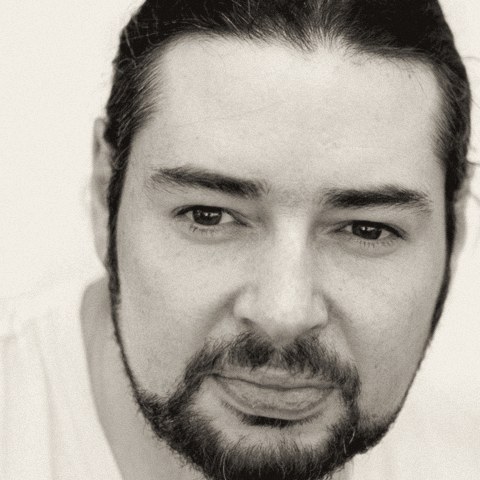
Peter Koen is a user experience designer in Cape Town. In 2005 he co-founded InfoSlips, which grew to more than 2,000 corporate customers in 144 countries, and in 2015 he started pondo, a design collective for enterprise and back-office software.
He is building Kit because the memory your AI keeps should belong to you, not to whoever sells the model. Owning it has to be the easier choice, and that is a design problem before it is an engineering one.
Write to him through the form below, or find him on LinkedIn.
Contact
Tell us what you want your AI to stop forgetting.
A product decision, a design rule, a recurring client exception, or architecture context: describe the work and the tools you use. Beta questions and technical collaboration both reach Peter here.
Goes straight to Peter at kit-project.com. No auto-reply, no list.
Something went wrong sending that. Try again, or email kit@kit-project.com directly.